Find the Interview links--
http://milanhingu.blogspot.in/2013/07/microsoft-dynamics-crm-technical_5.html
https://crmbusiness.wordpress.com/2011/03/07/crm-2011-common-crm-interview-questions/
https://crmtipsbyprm.wordpress.com/tag/crm-2015-interview-questions/
hosk interview question
Arpit Crm Interview Question
Q1.How to add and delete user in online MS CRM ?
Ans- User can be added in CRM on line by logging as admin in microsoft 365 , there go in admin
add user also add the licesense to that user.
Q2. How to disable save functionality at organisation level?
Ans: For this go in setting -->system setting -->General Tab--> Select No in Enable Auto Save in all forms.To disable on particular form call the following function onSave event .
Q3. How to compare current date using business rule ?
Ans - We can use javascript
Q4. What is the scope of business rule ?
Q5. What are the steps to configure business rules ?
Q6.How we can call plugin from process ? Tell the steps ?
Q7. How to configure BPF process ?
Q8. What is cross functional process ?
Q9.What makes a class plugin and workflow ?
Q10. How we can pass parametere from one plugin to another ?
Q11. what is the use of Iorganisation service ?
Q12.what are the properties available in IPlugin interface ?
Q13.How to configure a queue ?
Q14.How to configure a Email Router ?
Q16.can we apply audit to system entity ?
Q17. What is translation , IEMI ?
Q17.How to configure access and privilege team in MS CRM ?
Q18. what is cascading behaviour ?
Q19.Suppose a note attached to a case entity then we can modify this note but same case attached with contact entity then we cant edit the contact why ?
Q20. What database is created in online crm ?
Ans - MSCRM_Config and MSCRM_orgname.
Q21. why you think MS_organisation is created in ms crm ?
Q22. What is publisher and solution ? what is the use of both ?
Q23. What are the types of entity in ms crm ?
Q24.What are the types of Views ?
Ans -- There are two types of views - System and Personel views
System Views - System Views can be owned by organisation.
-- Views by all
-- Access can be configured by all or none.
-- Sharing does not all allow as views is at organisation level.
-- Fully supported to be transported to solution .
-- High level user can access of CRUD operation.
Q25 - Difference between Find and Advanced Find? Which one is faster and why?
Ans- Find perform a search on an attribute for which it is defined. Advanced Find perform search on the conditions and the attributes for which user customizes or runs it. Normal Find in faster as it looks for one attributes and matches with that and returns the result whereas Advanced Find searches for all the attributes and conditions while parsing through the records. Find is applicable on only active records and it finds only on 2 or 3 column which we have defined in the find view and even it returns any those column which is there in the view but advanced find is applicable to all the records and it finds all the columns and even it returns all the column and filter criteria can be on any column and most important - find filters on just one condition but advanced find filters on multiple condition at one time.. Find is faster than Advanced Find.
Q25.How we can add custoum button ribbon work bench tool ?
Q26. Suppose if 25 user trigger the plugin then will 25 instances get created ?
Q27. Which one will trigger first javascript , work flow , plugin or business rules and why ?
Q28. How do you deploy solution from dev to production server ?
Ans - Managed or Unmanged solution is exported from dev and its is imported in production server.
Q29 .Suppose Account and contact have 1: N relationship then how we can disable the contact record on disabling account record ?
Q30. How to add custom button in form ?
Ans:
https://mahenderpal.wordpress.com/tag/create-custom-command-button-in-ms-crm-2015/
Step1- write your js and save and publish it.
Step2. download ribbon work bench and select our solution.
Step3 Drag command button from toolbox and put in form next to system button .
step 4: Right click on system Save button and select Customize Command
Step 5:Use same properties of system Save button to our custom button exceptSequence and CommandCore properties (we need to copy and paste these properties one by one)

Q- How to get user name and ID in MS crm ?
Ans-
Q31 - What is role based and object based security ?
Ans-
https://crmprogrammer.wordpress.com/2015/01/31/what-is-the-difference-between-role-based-and-object-based-security-model-in-ms-dynamics-crm/
Object based security comes into picture when we share a record. It's specific to an entity instance wherein Role based security is for an Entity. In Object based security we use a term called "Access Right" which defines what action(Read, Write, Append, AppendTo, Delete..) that specific user can perform on the shared record. Wherein Role based Security defines what action(Privilige) and at what level(Access Level - User, Org, Parent- Child BU, BU) a user can interact with an entity. If you observe in Object Based Security, we don't talk about "Access Level" as this is specific to a specific entity record. To have an access right on a specific record the user should have "Read" privilige on the entity as part of his Security Role(Role Based Security).
Q32. What is diffrence between Discovery and Organisation URL?
Q33- What is string map -
And -
Query : select TicketNumber[TicketNumber],statuscode[Status] from incident
Q- How much records can be fetch from query expression and fetch xml ?
Ans-
Q. suppose i have 20 k records how i can show count of that records while fetch xml can read only 5 k record at a time.
Ans-
Q. how i can create N:N relationship with entity creation ?
Q.what is prefilter ?
Ans- Have you been looking for a way to retrieve and view query results faster? Pre-filter the data!
Q.what is servicefactory is Iplugin ?
Q.how i can disable autosave in crm - already explained
Q.How to count the records of subgrid in a form
Ans-
Q.What is native and secondary relationship ?
Q.What are the types of N:N relationship
Ans-
Q.Can we fetch records which are not joined ?
Ans- Connections
Q.suppose we have BPF on case entity and we added stage name s1 with required field case Title .But while creating case this BPF is not going to next stage ? what might be the reason
Q. Suppose by mistake I have registred a plugin on pre operation while it should be register at post operation . So in code what we can do to restrict the plugin to run in pre operation .?
Ans-
Q.How to find the control that have been added in HTML web resource ?
Ans-
http://milanhingu.blogspot.in/2013/07/microsoft-dynamics-crm-technical_5.html
https://crmbusiness.wordpress.com/2011/03/07/crm-2011-common-crm-interview-questions/
https://crmtipsbyprm.wordpress.com/tag/crm-2015-interview-questions/
hosk interview question
Arpit Crm Interview Question
Q1.How to add and delete user in online MS CRM ?
Ans- User can be added in CRM on line by logging as admin in microsoft 365 , there go in admin
add user also add the licesense to that user.
Q2. How to disable save functionality at organisation level?
Ans: For this go in setting -->system setting -->General Tab--> Select No in Enable Auto Save in all forms.To disable on particular form call the following function onSave event .
function preventAutoSave(econtext) {
 var eventArgs = econtext.getEventArgs();
 if (eventArgs.getSaveMove() == 70) {
 eventArgs.preventDefault();
 }
}
http://www.mohamedibrahim.net/blog/2013/09/29/disabling-microsoft-dynamics-crm-2013-auto-save-feature-for-a-specific-entity-form-or-a-crm-organisation-to-avoid-undersired-execution-of-plugins-or-workflows/
Q3. How to compare current date using business rule ?
Ans - We can use javascript
Use this script on the OnChange event of the field.
function FieldValueChange(){
Xrm.Page.getAttribute("new_todaydate").setValue(Date.now());
}
Xrm.Page.getAttribute("new_todaydate").setValue(Date.now());
}
Q4. What is the scope of business rule ?
Q5. What are the steps to configure business rules ?
Q6.How we can call plugin from process ? Tell the steps ?
Q7. How to configure BPF process ?
Q8. What is cross functional process ?
Q9.What makes a class plugin and workflow ?
Q10. How we can pass parametere from one plugin to another ?
Q11. what is the use of Iorganisation service ?
Q12.what are the properties available in IPlugin interface ?
Q13.How to configure a queue ?
Q14.How to configure a Email Router ?
Q16.can we apply audit to system entity ?
Q17. What is translation , IEMI ?
Q17.How to configure access and privilege team in MS CRM ?
Q18. what is cascading behaviour ?
Q19.Suppose a note attached to a case entity then we can modify this note but same case attached with contact entity then we cant edit the contact why ?
Q20. What database is created in online crm ?
Ans - MSCRM_Config and MSCRM_orgname.
Q21. why you think MS_organisation is created in ms crm ?
Q22. What is publisher and solution ? what is the use of both ?
Q23. What are the types of entity in ms crm ?
Q24.What are the types of Views ?
Ans -- There are two types of views - System and Personel views
System Views - System Views can be owned by organisation.
-- Views by all
-- Access can be configured by all or none.
-- Sharing does not all allow as views is at organisation level.
-- Fully supported to be transported to solution .
-- High level user can access of CRUD operation.
System Views
If you have a sub-grid of another entity on your form and you want to select a particular view to show in that sub-grid, you must use a system view. Take a look at the image below. You’ll notice that the Default View does not have the option for selecting a personal view.
Personal Views
When creating personal views, you need to make sure that the proper rights are given to your users. Oftentimes someone creates a view and then forgets to share it, and sometimes, even if the view is shared, the creator forgets to give anyone else edit or delete privileges. If the user who created the view ever leaves, the view will remain but no one will have the privileges necessary to make any changes or to delete it. Be sure to share your personal views with the required users or teams and give them sufficient privileges.
To share views - share views
To share views - share views
Q25 - Difference between Find and Advanced Find? Which one is faster and why?
Ans- Find perform a search on an attribute for which it is defined. Advanced Find perform search on the conditions and the attributes for which user customizes or runs it. Normal Find in faster as it looks for one attributes and matches with that and returns the result whereas Advanced Find searches for all the attributes and conditions while parsing through the records. Find is applicable on only active records and it finds only on 2 or 3 column which we have defined in the find view and even it returns any those column which is there in the view but advanced find is applicable to all the records and it finds all the columns and even it returns all the column and filter criteria can be on any column and most important - find filters on just one condition but advanced find filters on multiple condition at one time.. Find is faster than Advanced Find.
Q25.How we can add custoum button ribbon work bench tool ?
Q26. Suppose if 25 user trigger the plugin then will 25 instances get created ?
Q27. Which one will trigger first javascript , work flow , plugin or business rules and why ?
Q28. How do you deploy solution from dev to production server ?
Ans - Managed or Unmanged solution is exported from dev and its is imported in production server.
Q29 .Suppose Account and contact have 1: N relationship then how we can disable the contact record on disabling account record ?
Q30. How to add custom button in form ?
Ans:
https://mahenderpal.wordpress.com/tag/create-custom-command-button-in-ms-crm-2015/
Step1- write your js and save and publish it.
Step2. download ribbon work bench and select our solution.
Step3 Drag command button from toolbox and put in form next to system button .
step 4: Right click on system Save button and select Customize Command
Step 5:Use same properties of system Save button to our custom button exceptSequence and CommandCore properties (we need to copy and paste these properties one by one)
Now we need to check command which is associated with system save button and need to see which function and parameter used for that. Follow below steps
- Select Mscrm.SavePrimary under Commands and click on Actionslookup to check for function name and parameter, we got this command name from Save button commandcore property

- Right click on Command and select Add New, we need to add command for your custom Save button
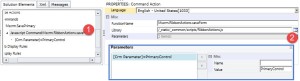
- Click on Actions lookup -> click on Add and select JavaScript Function Action
- Write our function name and select our web resource.
- Click on Parameters lookup->click on Add and select Crm Parameter
- Select Primary Control under Value drop down
- It should look like below

- Select our custom Save button and select our command name undercommand drop down
- Right click on system Save button and select Hide Button option
- Click on Publish button to publish your changes.
- Open our java script web resource and change function definition like below
function OverrideSave()
{//Capture response
var response=confirm(“Do want to save ??”);
if(response==true){
//system function
Mscrm.RibbonActions.saveForm();
} }
- Save and Publish web resource and open any account record.
- Chang some field value and click on Save button you should get prompt like below
Q- How to get user name and ID in MS crm ?
Ans-
f you want to get current user id in crm 2011 form you can use Xrm.Page.context, you have to use
getUserId() method for this you can use it like below
getUserId() method for this you can use it like below
Xrm.Page.context.getUserId()
But if you want to get current user name then you can use below function to retrieve it
function Getinfo() {
var context;
var serverUrl;
var UserID;
var ODataPath;
context = Xrm.Page.context;
serverUrl = context.getServerUrl();
UserID = context.getUserId();
ODataPath = serverUrl + “/XRMServices/2011/OrganizationData.svc”;
var retrieveUserReq = new XMLHttpRequest();
retrieveUserReq.open(“GET”, ODataPath + “/SystemUserSet(guid'” + UserID + “‘)”, true);
retrieveUserReq.setRequestHeader(“Accept”, “application/json”);
retrieveUserReq.setRequestHeader(“Content-Type”, “application/json; charset=utf-8”);
retrieveUserReq.onreadystatechange = function () {
retrieveUserReqCallBack(this);
};
retrieveUserReq.send();
var context;
var serverUrl;
var UserID;
var ODataPath;
context = Xrm.Page.context;
serverUrl = context.getServerUrl();
UserID = context.getUserId();
ODataPath = serverUrl + “/XRMServices/2011/OrganizationData.svc”;
var retrieveUserReq = new XMLHttpRequest();
retrieveUserReq.open(“GET”, ODataPath + “/SystemUserSet(guid'” + UserID + “‘)”, true);
retrieveUserReq.setRequestHeader(“Accept”, “application/json”);
retrieveUserReq.setRequestHeader(“Content-Type”, “application/json; charset=utf-8”);
retrieveUserReq.onreadystatechange = function () {
retrieveUserReqCallBack(this);
};
retrieveUserReq.send();
}
function retrieveUserReqCallBack(retrieveUserReq) {
if (retrieveUserReq.readyState == 4 /* complete */) {
if (retrieveUserReq.status == 200) {
var retrievedUser = this.parent.JSON.parse(retrieveUserReq.responseText).d;
if (retrievedUser.FullName!= null)
alert(retrievedUser.FullName);
if (retrieveUserReq.readyState == 4 /* complete */) {
if (retrieveUserReq.status == 200) {
var retrievedUser = this.parent.JSON.parse(retrieveUserReq.responseText).d;
if (retrievedUser.FullName!= null)
alert(retrievedUser.FullName);
Q31 - What is role based and object based security ?
Ans-
https://crmprogrammer.wordpress.com/2015/01/31/what-is-the-difference-between-role-based-and-object-based-security-model-in-ms-dynamics-crm/
Object based security comes into picture when we share a record. It's specific to an entity instance wherein Role based security is for an Entity. In Object based security we use a term called "Access Right" which defines what action(Read, Write, Append, AppendTo, Delete..) that specific user can perform on the shared record. Wherein Role based Security defines what action(Privilige) and at what level(Access Level - User, Org, Parent- Child BU, BU) a user can interact with an entity. If you observe in Object Based Security, we don't talk about "Access Level" as this is specific to a specific entity record. To have an access right on a specific record the user should have "Read" privilige on the entity as part of his Security Role(Role Based Security).
Role based security is entirely coded in the application itself. Role based security uses one of the authentication/authorization mechanisms of the application server.
The fundamental concept in role-based security is that of privilege, defined at design time, on a system-wide basis. Each user has a set of privileges (there are well over a hundred privileges) that are enabled for that user. However, Policies and Roles grant privileges and simplify the process.
The other form of security applies to individual instances of objects. There is a fundamental difference between an access right and a privilege: an access right is a right granted to a user on an object), but a privilege is a right granted to a user on a class of objects. Access rights apply only after privileges have taken effect. In other words, if a user does not have the privilege to read accounts, the user will not be able to read any account, whether or not it has been shared.
Q32. What is diffrence between Discovery and Organisation URL?
Q33- What is string map -
And -
Ever wonder how (or where) CRM stores the related values for pick lists or Option set ?
Answer is in String Map Table
So what is string map table actually means in CRM?
String map table basically used in MSCRM for storing the details of Option Set Fields exists in an organization. It contains all the data (Attribute Name, Option Set name, option value , option name, Object Type Code) of option set.
Let’s take one requirement to clear the use of StringMap table, requirement is like:
“Show the incident by status Name”
like: "CAS-T4R4F-U7Y6T5" shown status as "Problem Solved"
So in this scenario if we will have no string map table then either you need records which contain all the distinct type of record by status or you need hard code value use in report query.
By String Map table you can join the table and can collect all the status present in incident and can collect records number by grouping of them.
So this type of many scenarios can be fulfill by this table
Result of Case with Status Without using Stringmap Table :
Result of Case with Status using Stringmap Table :
Query :
select INC.TicketNumber[Case ID],SMT.Value[Status Name], SMT.AttributeValue[Status Value]
from incident as INC inner join StringMapBase as SMT
on INC.StatusCode = SMT.AttributeValue
where SMT.AttributeName='statuscode' and SMT.ObjectTypeCode=112
from incident as INC inner join StringMapBase as SMT
on INC.StatusCode = SMT.AttributeValue
where SMT.AttributeName='statuscode' and SMT.ObjectTypeCode=112
Q34- What is Append and AppendTO
Ans-
Q35 - How to auto number ?
Ans-
Q36 - What is global menu ?
Ans- Global menu is like option set or picklist or dropdownlist . when we create the global menu
it can be reasuable. It means that while creating any option set in form we can re use this global option set.
Q37 .What is PrinciplalObjectAccess table why is it used?
Ans-
The POA table is used to provide access to specific records for CRM users, and each record in the POA table represents one CRM object that is related to one CRM user. Records created in the POA table come from one of four ways:
· Share reassigned records with original owner: CRM System Settings
o If this is set to Yes, then records would be added to the POA table whenever an assign takes place. These records will have a value in the AccessRightsMask colum of the POA table.
· Direct sharing: Actions – Sharing
o When users explicitly share a record to another user, a record would be created in the POA table. These records will have a value in the AccessRightsMask colum of the POA table.
· Reparent Setting: Relationship Behavior
o Each entity has relationships with other entities (ex. Account to Case). By default, the Reparent option is set to Cascade All. With this setting, sub records would be shared to the owner of the parent record. For example: Let’s say that User1 owns Account1. User2 has access to Account1 and creates a case underneath Account1. With the out of the box Reparent options, a record would be created in the POA table that would give User1 access to the newly created case. These records will have a value in the InheritedAccessRightsMask colum of the POA table.
· Indirect Sharing: When sharing occurs through a direct share, assignment, or parenting, if the relationship is set up to cascade the share to child records, additional records will be created in the POA table in order to give proper permissions to the new user for the relevant child records. These records will have a value in the InheritedAccessRightsMask colum of the POA table.
Q- How much records can be fetch from query expression and fetch xml ?
Ans-
Ans-
Q. how i can create N:N relationship with entity creation ?
Q.what is prefilter ?
Ans- Have you been looking for a way to retrieve and view query results faster? Pre-filter the data!
Data pre-filtering in Microsoft Dynamics CRM reports lets you retrieve and display result sets quickly, makes reports context-sensitive, and allows reports to be filtered using the Advanced Find feature. Data pre-filtering complements data filtering supported by Microsoft SQL Server Reporting Services, which limits the data returned by reports. There are two ways that you can enable data pre-filtering:
- Automatic Pre-Filtering: Automatic data pre-filtering, which is suited for simple queries, can be enabled by aliasing entity tables in the queries. The alias name should begin with "CRMAF_". When you enable automatic data pre-filtering using the "CRMAF_" prefix, Microsoft Dynamics CRM modifies the query to include a parameter (for example, P1), and then passes a query to the P1 parameter depending on how the report is being filtered. In other words, automatic data pre-filtering acts as a sub-query within an existing query.
- Explicit Pre-Filtering: For complex queries such as queries using UNION statements, you might need to use explicit pre-filtering. Unlike in automatic pre-filtering, Microsoft Dynamics CRM does not rewrite the report query by passing values to the parameters during explicit pre-filtering when a report is uploaded to Microsoft Dynamics CRM. You have to explicitly make the required changes by adding the pre-filtering parameter to the report, and then reference the parameter in the query. You can then execute the query using dynamic SQL.
For detailed information about enabling data pre-filtering on reports, including query examples and the limitations of using automatic data pre-filtering with complex queries, see Using Filters in a Report .
Q.what is servicefactory is Iplugin ?
Q.how i can disable autosave in crm - already explained
Q.How to count the records of subgrid in a form
Ans-
Q.What is native and secondary relationship ?
Q.What are the types of N:N relationship
Ans-
Q.Can we fetch records which are not joined ?
Ans- Connections
Q.suppose we have BPF on case entity and we added stage name s1 with required field case Title .But while creating case this BPF is not going to next stage ? what might be the reason
Q. Suppose by mistake I have registred a plugin on pre operation while it should be register at post operation . So in code what we can do to restrict the plugin to run in pre operation .?
Ans-
Q.How to find the control that have been added in HTML web resource ?
Ans-

CRM is an abbreviation of Customer Relationship Management. As the name suggests, CRM helps your organization nourish the bond with your customers or clients. It is the link between the human brain and customer data. This data can be a gold mine while providing services to an existing or potential client.
ReplyDelete